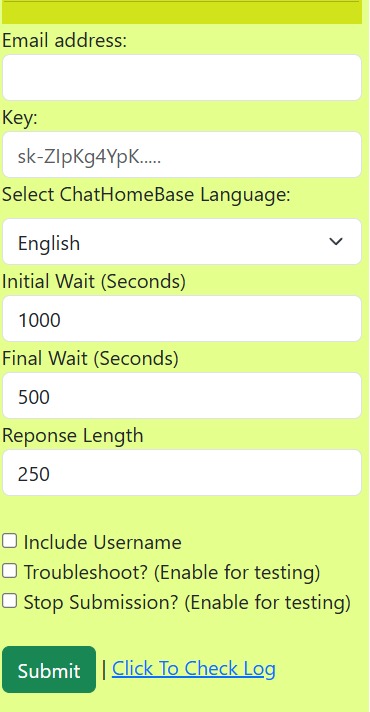
App Interface
1. Email address: Enter your ChatHomeBase bot subscription email.
2. Key: Enter your ChatGPT key.
3. Language: Select your ChatHomeBase account language from the dropdown.
4 & 5. Initial & Final Wait: This defines the wait while the bot types your message to make it feel natural. By default, it is set to the average typing speed. Don’t change unless advised.
6. Response Length: Defines how long the bot’s message should be. By default, it is set to 250 characters, but you can reduce or increase it.
7. Include Username: Enable this if you want to include your username (ID) in the message.
8. Troubleshoot: Enable only if instructed. This is used to catch errors if the bot has issues.
9. Stop Submission: When enabled, the bot will generate and type the message but not submit it. This allows you to review quality and relevancy before sending.